
To set up a new Conversations dataset for your Herodesk AI Agent:
- Click on AI Agents in the left-hand menu
- Choose your AI Agent
- Click on "Datasets" on the left-hand menu
- Click "Add Dataset" on the top right
- Choose "Help Center Dataset"
Configure the dataset
You will now see a window that lets you configure this dataset, to decide which help centers, articles and FAQs you want to train your AI Agent on.
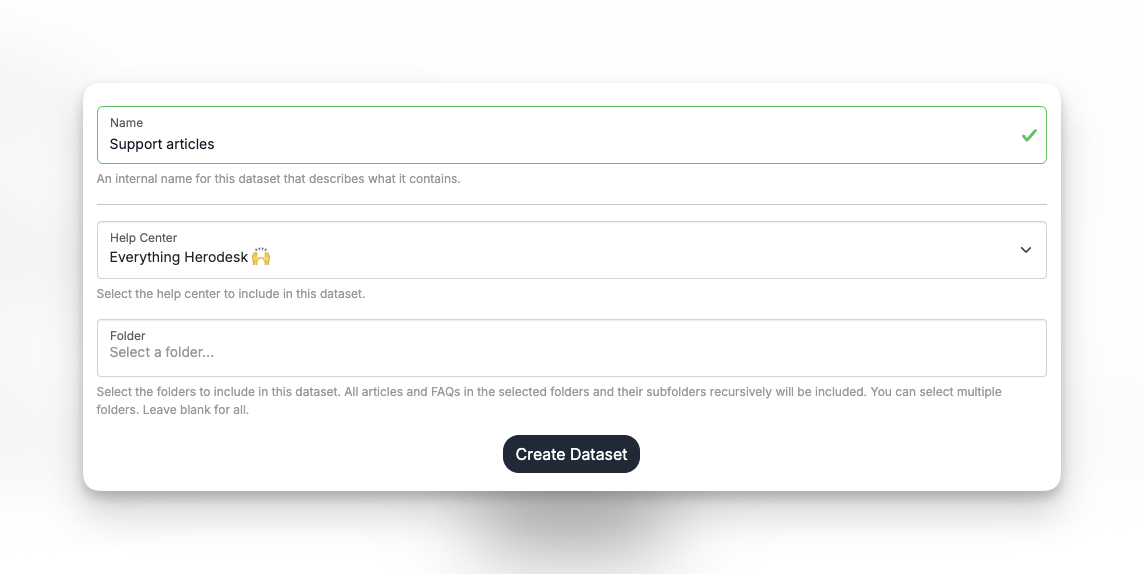
Name: Set an internal name that you can set, so you know which help center content this dataset contains.
Help Center: Choose the help center you want to train your AI Agent on.
Folder: Choose one or more folders. All articles and FAQs in the chosen folder(s) and their subfolders (recursively) will be part of the training material. Leave blank for all.
Click "Create Dataset" to save changes.
Now your AI Agent will be trained on all the selected articles and FAQs.
If you update them, add new one or delete existing ones, the AI Agent will automatically detect this and update its knowledge, too.