
To set up a new Conversations dataset for your Herodesk AI Agent:
- Click on AI Agents in the left-hand menu
- Choose your AI Agent
- Click on "Datasets" on the left-hand menu
- Click "Add Dataset" on the top right
- Choose "Conversations Dataset"
Notice that we only train AI Agents on conversations between a customer and a human agent. We do not train it on conversations between a customer and an AI Agent.
Also notice that we only train it on actual messages sent to and from customers, not internal notes, auto responders, etc.
All conversations that the AI Agents are trained on are anonymized.
Configure which conversations to train your AI Agent on
You will now see a pop-up where you can determine which conversations in your Herodesk that you want to train your AI Agent on.
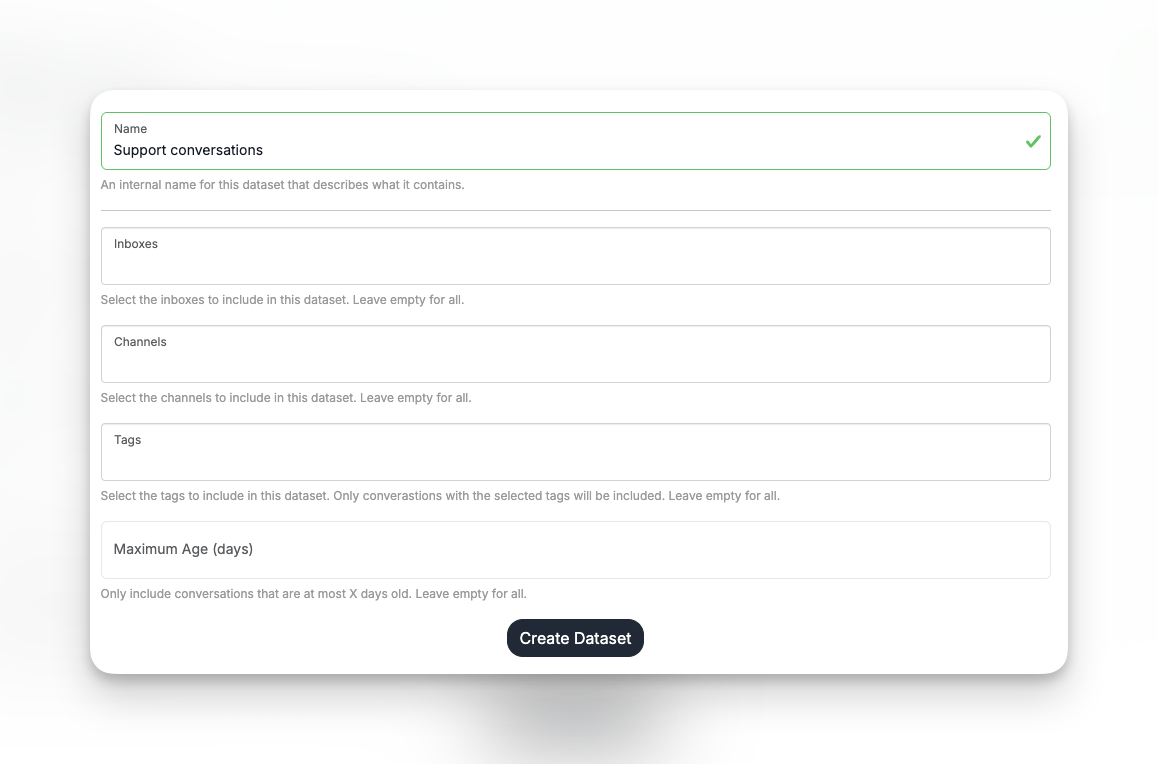
Name: Set an internal name that you can set, so you know which conversations this dataset contains.
Inboxes: Choose which inboxes the conversations must be in. Leave blank for all.
Channels: Choose which channels the conversations must be using. Leave blank for all.
Tags: Choose which tags the conversations must have. Leave blank for all.
Maximum age: Choose how old a conversation can at most be, for it to be part of the AI Agents knowledge. This updates automatically, so if you set it to 30 days, we will automatically keep your AI Agents' knowledge up-to-date with the last 30 rolling days. Conversations older than that will be removed from your AI Agents' knowledge.
It may not always be best to simply train your AI Agent on all conversations in your Herodesk. Often, less but accurate data is better than lots of inaccurate data.
If the replies you send to your customers generally contain information or details that are relevant to others, and therefore good data to train your AI agent on, add all conversations.
If not, choose the inbox(es) that has the relevant conversations.
You can be even more precise by creating a tag, fx, "AI training", and apply that to the conversations you want to train your AI agent on.
That helps ensure that your AI agent is trained on good, relevant data, ultimately leading it to give better responses.
Click Create Dataset to save it.
Now, our system will start training your AI Agent on the conversations. It can be trained on approx. 10 per second, so if you have thousands of conversations, it will take a while before the AI Agents' knowledge is fully updated.