
While our Public REST API lets you fetch data at your convenience, Webhooks are designed to send notifications when certain events happen in Herodesk.
Examples of such events are when a new conversation is created, when it's updated or when a new message is either sent from or received by Herodesk.
By setting up Webhooks, you can build custom integrations that react whenever something happens inside Herodesk.
This is a great alternative to creating a cronjob that pulls the API for changes on a given interval.
Setting up Webhooks
To set up new Webhook, go to your Herodesk -> Settings -> API & Webhooks and select the "Add Webhook" button.
You will now see this screen:
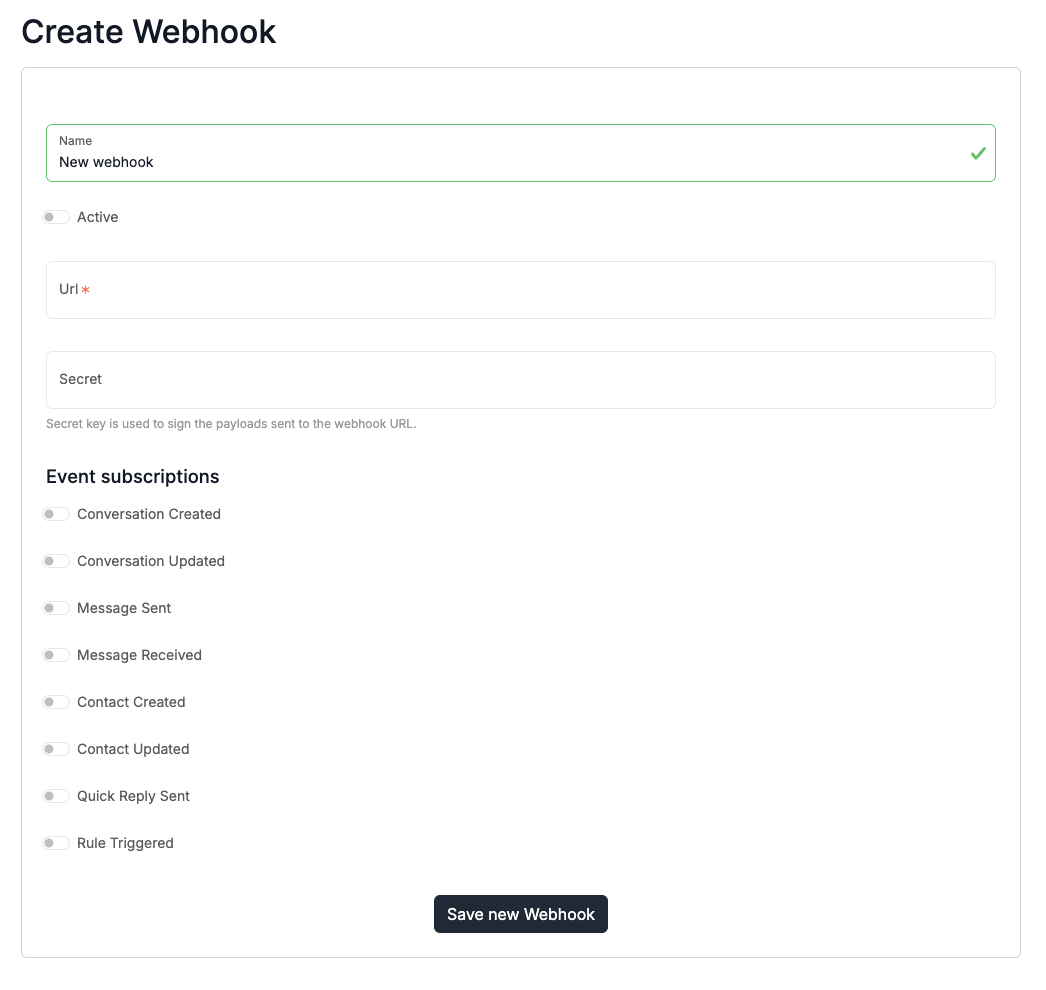
Name: An internal name you give this webhook so you can recognize it in the future.
Active: Only active webhooks will send.
URL: The URL address that we will send the webhooks to. This should be an endpoint you define and set up to receive the webhooks.
Secret: All webhooks are signed with a secret. This lets you validate the authenticity of the webhook and confirm that it is indeed sent from Herodesk.
Event subscriptions: Select all the events you wish to send to this endpoint.
Headers & Signature
Every webhook is sent with the following headers:
- X-Herodesk-Event: The event that triggered this webhook.
- X-Herodesk-Signature: The signature you can use to verify its authenticity.
The signature is a unique signature to let you verify its authenticity.
The signature can be read from the X-Herodesk-Signature header and is formatted like this:
$signature = hash_hmac('sha256', $payload, $secret)
With the $payload being the data we send, and the $secret being your secret.
Payload
Every webhook sends a JSON Payload in its body. The payload varies depending on which type of webhook event is sent.
The payload will, however, always include the id of the affected object + other metadata.
While some webhook systems only send the id and requires you to do a API lookup to fetch relevant data, we send the whole object in the webhook payload, so it's ready for you to work with immediately.
Filtering webhooks
Herodesk will send a webhook to each of your endpoints that subscribe to the relevant events.
This will happen every time the event occurs in Herodesk. You cannot filter these from Herodesk.
If you only wish to handle some events, fx only changes to conversations with specific tags, you must do this filtering at your endpoint and discard the webhooks that do not match your wishes.
Limits
Webhooks are not available for Herodesk Free & Herodesk Basic.
Herodesk Plus customers can create unlimited webhooks.
Failed events & retries
If we, for some reason, are unable to deliver the webhook to your designated endpoint, the most recent error message will be saved and available in the Webhook settings.
We will try to deliver each webhook up to four times:
- Immediately
- After 1 minute delay
- After 5 minute delay
- After 25 minute delay
If all four delivery attempts fail, the webhook will be removed.
We do not guarantee delivery of webhooks.