
Install Herodesk as an app on your phone, so you always have Herodesk at your fingertips when your customers need help. You can enable push notifications to get alerts when you receive a message, allowing you to reply quickly or assign it to a teammate – even when you're on the go.
Downloading Herodesk app to your phone is quick and easy. Here’s what you need to do:
1. Open your browser on your phone
2. Go to herodesk.io and log in with your account
3. Tap the middle icon with the square and upward arrow at the bottom of your browser
4. Tap "Add to Home Screen"
5. If you’d like to rename the app, you can do so here –> Tap add
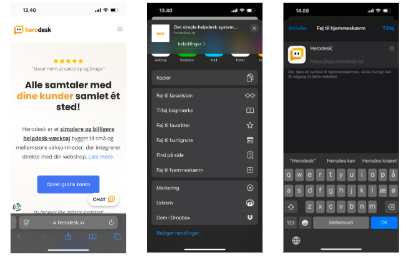
The app is now installed on your iPhone's home screen.
If you’d like to receive a notification when a new conversation lands in your inbox just follow the steps below:
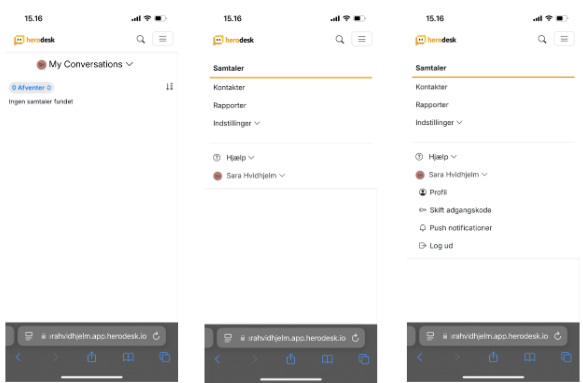
- Open the App and sign in
- Tap the three horizontal lines in the top-right corner3.
- Tap the dropdown arrow next to your name4.
- Select Push Notifications5.
- Enable push notifications6.
- Choose when and from which inbox(es) you want to receive notifications7.
- Scroll down and tap Save
Your notifications are now activated!
If push notifications no longer work
If push notifications stop working, we recommend deleting the app from your home screen and reinstalling it using the abovementioned steps.
No data will be lost or affected by reinstalling the app on your smartphone.