
By default, all e-mails sent from Herodesk are sent using:
First name from Organization name
as sending name. So when received in by the customer, it'll say fx:
Anders from Herodesk
in the overview. If you wish to change that, here's how.
Every inbox has a "Sender Name Template". Go to: Settings -> Inboxes and edit the inbox.
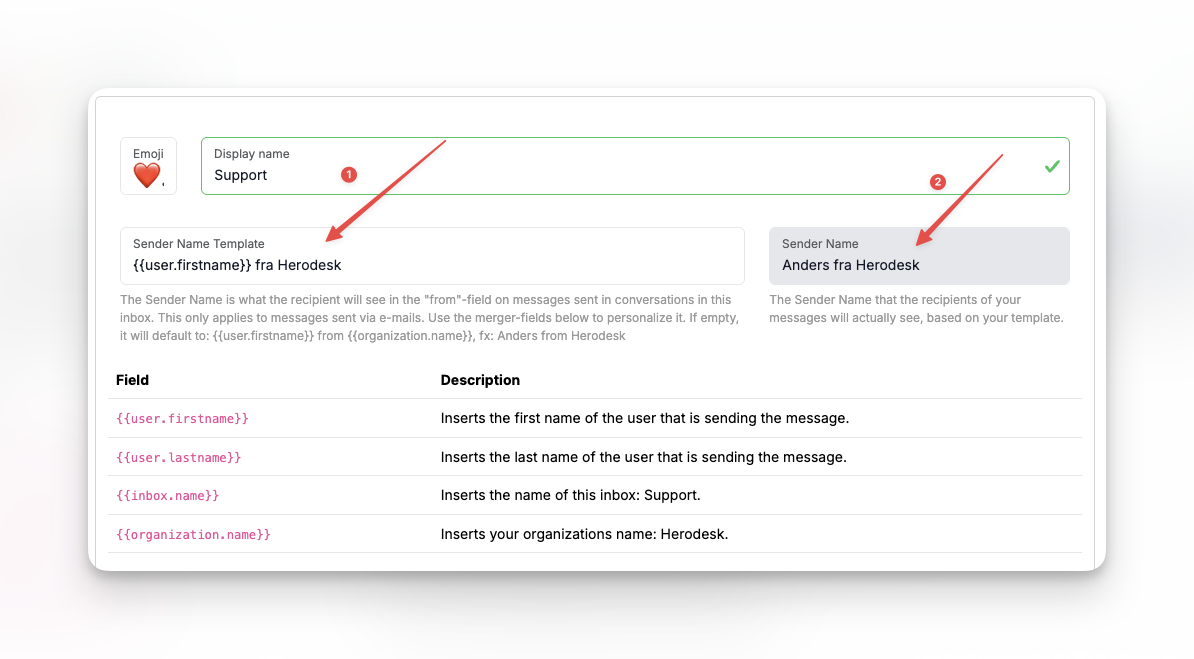
In the first field (labelled as 1 on the image above), you enter the sender name template. You can use the merge fields in the table below.
This will automatically be applied to all e-mails sent in conversations in this inbox.
In the second field (labelled as 2 on the image above), you can see what it looks like for the customer when they receive the message.
Changing this takes immediate effect and affects all future send emails.
Changing "Operator from .."
Auto responders and other automatic replies are sent using the "Operator" user. It is a default system user that is used for purposes like this.
If you wish to change that name, go to Settings -> Users and edit the "Operator" user.
Here, you can change its firstname to whatever you like. If you set it to "Customer support" and use the default sender name template, future auto responders will be sent using "Customer support from Herodesk" as their sender name.