
To receive your emails from Gmail in Herodesk, you need to set up an email forwarder. This can be done either directly in Gmail or in Google Workspace. The advantage of setting it up in Google Workspace is that all spam emails will also be forwarded to Herodesk. This means that if an email is mistakenly marked as spam, it will still be forwarded to Herodesk.
Follow the steps below to set up the email forwarder:
1. Log in to Google Workspace and go to the Admin console
2. Select Apps → Workspace → Gmail
3. Scroll to the bottom and select Routing
4. Choose “Email forwarding using recipient address map”
5. Add the email address(es) to forward from (e.g. test@yourdomain.com) and the recipient address (system address), which you can find under each channel in Herodesk
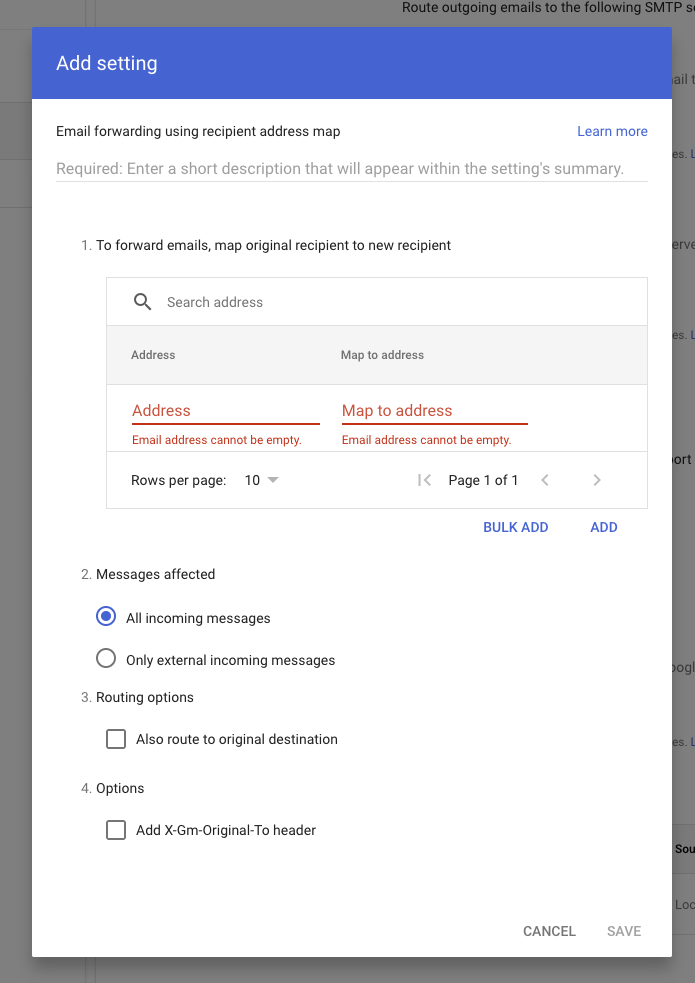
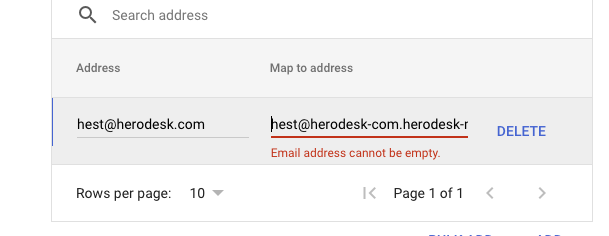
6. When you have added all email addresses that should be forwarded to Herodesk, give the forwarding rule a name at the top
7. If you want copies of all emails to remain in Gmail as well, check option 3: “Also deliver to original destination.”
8. Click Save, and your forwarder(s) are now set up