
To get started with Herodesk, you must first connect your channels.
A channel is how messages are sent to and from your customers.
Herodesk supports multiple channels, such as:
- Live chat
- Facebook Messenger
- Instagram DM's
You can connect multiple channels to the same Herodesk account.
For example, if you have three different support e-mail addresses for three different brands or languages, you can create an e-mail channel for each.
The same applies to the other channel types: You can create as many as you need to connect all your communication channels to Herodesk.
Set up a new channel
To set up a new channel, go to:
- Settings
- Channels
- Add Channel
And choose which channel type you wish to configure.
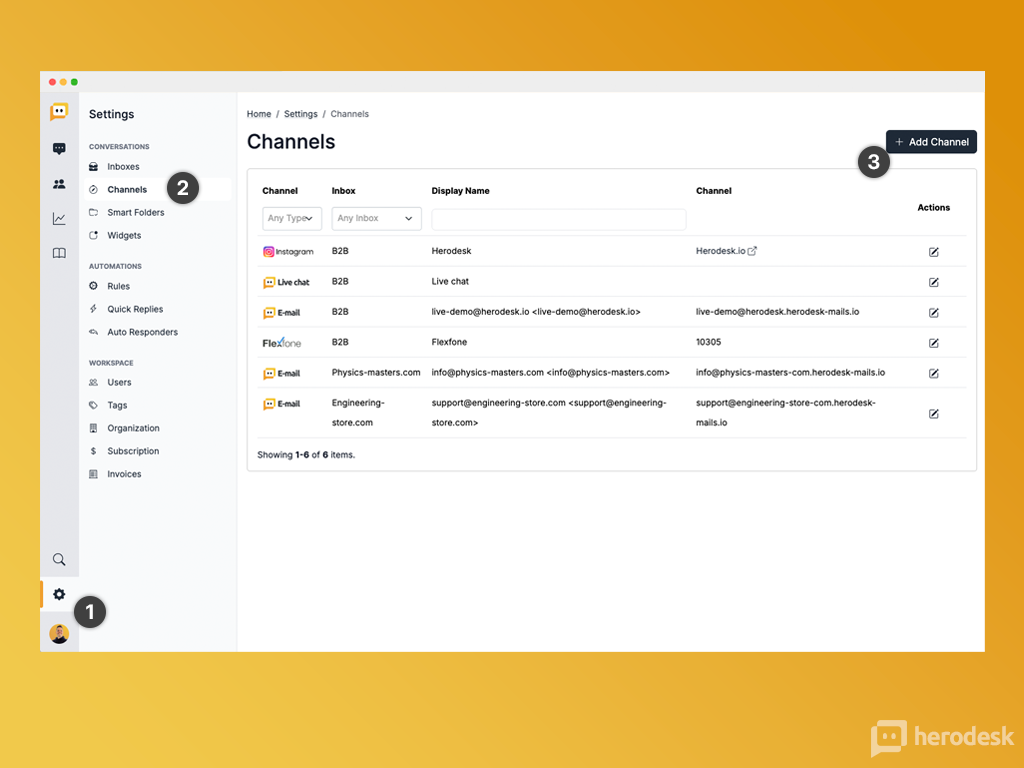
You can find guides on how to configure each type of channel with your Herodesk here: https://help.herodesk.io/en/c/5-channels
Channels and Inboxes
Each channel is associated with one inbox.
Whenever a message is received via that channel, it is put in the associated inbox.
While one inbox can contain messages from several channels, one channel can only send messages to one inbox.
It is possible to move a conversation between inboxes it is received, either manually or using Rules.